
Instructions to use LoliRimuru/AAT-JPEG-Artefact-Detection with libraries, inference providers, notebooks, and local apps. Follow these links to get started.
- Libraries
- TF-Keras
How to use LoliRimuru/AAT-JPEG-Artefact-Detection with TF-Keras:
# Note: 'keras<3.x' or 'tf_keras' must be installed (legacy) # See https://github.com/keras-team/tf-keras for more details. from huggingface_hub import from_pretrained_keras model = from_pretrained_keras("LoliRimuru/AAT-JPEG-Artefact-Detection") - Notebooks
- Google Colab
- Kaggle
AAT JPEG Artefact Detection (OUTDATED use https://huggingface.co/LoliRimuru/AAL-Plus_Image_Quality_Assessment)
Autodetects JPEG artefacts in categories of C100 (no artefacts), C95, C90, C85, C80, C70, C60, C40 and C20 (really terrible artefacts). The input is a 1024x1024 large image. The image is converted to gray scale to omit redundant informations and reduce overall training and inference time. Model is standalone.
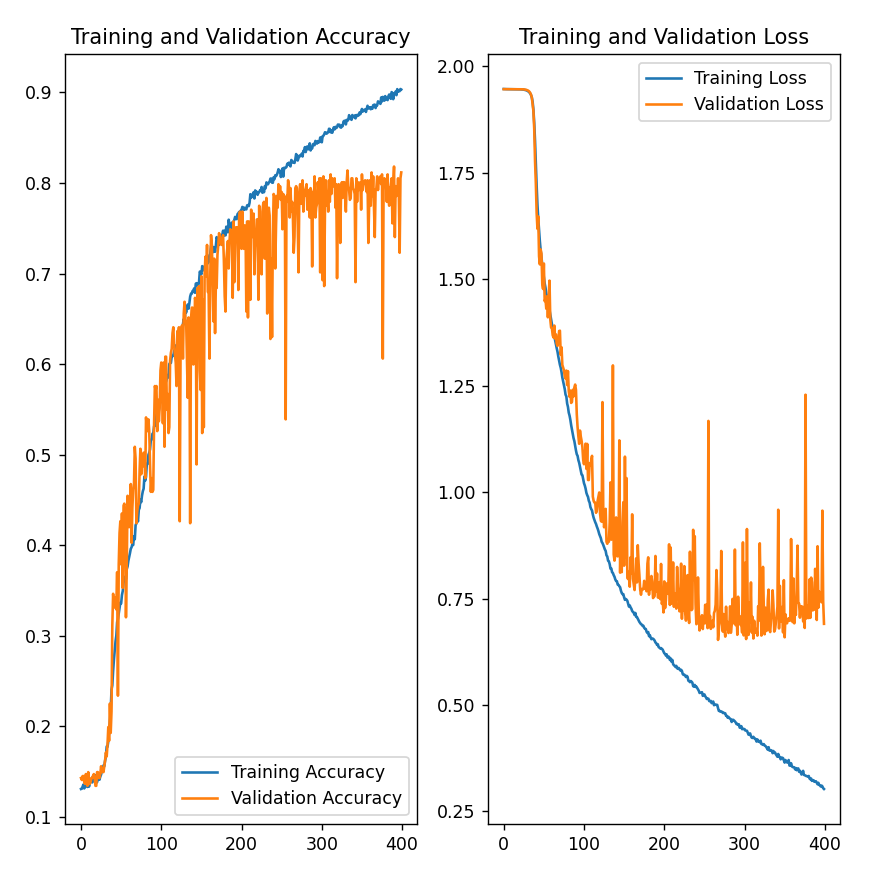
Training stats
Around 60k of images was used during training.
- Downloads last month
- -